Apple TV Converter for original Apple TV
View the Original Apple TV on a regular TV and/or record* the AppleTV content to DVD with a DVD Recorder.
NOTE: The new smaller, black, Apple TV2 only outputs HDMI, so this product is not compatible with the new Apple TV2. If you would like to convert the HDMI port on the new Apple TV2 to S-Video or Composite Video, then consider our HDMI Video converters.
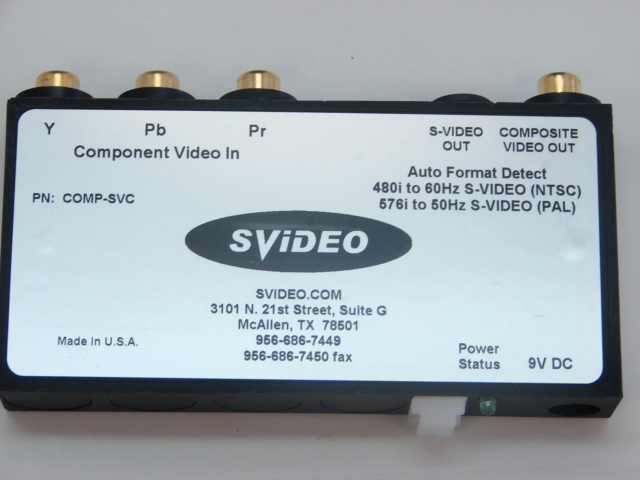
Our AppleTV Converter is an exclusive converter of svideo.com This product is not sold through distribution, retailers or other resellers; we only sell it on this website. This product converts the 480i Component Video from Component Video sources (such as AppleTV, Vudu, TiVo HD, DVD Players, Sat HD DVRs, and other 480i sources) to S-Video and Composite Video, allowing you to use Standard TVs or other equipment (such as DVD Recorders*) that have an S-Video or Composite Video input. You can also use this box and our RF Modulator to connect to TVs that only have an RF Coax input.
This product is a plug-and-play automatic hardware decoder that provides instant decoding of the high quality component video signal to facilitate the viewing of content on televisions or other devices that do not have component video input.
Note: if using this product with the Apple TV you need to first disconnect the power cord on the Apple TV so that the Apple TV will reset itself and allow for the 480i component video option. Do not connect an HDMI cable to the Apple TV as it will then block the 480i option on the Video Settings of the Apple TV; until you again disconnect the power cord on the Apple TV. The Apple TV does not appear to be able to output both HDMI and Component at the same time...if you know of a hack, please let us know.
This is a "must have" product to connect your Apple TV through the S-Video (aka SVHS) input or composite video input of standard (non-wide screen) televisions.
Rating and comment on Order 168,971: "Excellent, Very good customer service! Highly recommend. Product works great as well. Apple TV for the UK on an old tube TV. Amazingly easy"
Comment on order 174,405: "I own three and am adding a 4th. Great unit."
Please scroll down to read details and to see screen shots and sample movies.
Availability: Ships same day. Please select the power supply that you want. A US Power Supply is included with this unit. The European power supply is 15.00 extra.
NOTE: The new smaller, black, Apple TV2 only outputs HDMI, so this product is not compatible with the new Apple TV2. If you would like to convert the HDMI port on the new Apple TV2 to S-Video or Composite Video, then consider our HDMI Video converters.
Our AppleTV Converter is an exclusive converter of svideo.com This product is not sold through distribution, retailers or other resellers; we only sell it on this website. This product converts the 480i Component Video from Component Video sources (such as AppleTV, Vudu, TiVo HD, DVD Players, Sat HD DVRs, and other 480i sources) to S-Video and Composite Video, allowing you to use Standard TVs or other equipment (such as DVD Recorders*) that have an S-Video or Composite Video input. You can also use this box and our RF Modulator to connect to TVs that only have an RF Coax input.
This product is a plug-and-play automatic hardware decoder that provides instant decoding of the high quality component video signal to facilitate the viewing of content on televisions or other devices that do not have component video input.
Note: if using this product with the Apple TV you need to first disconnect the power cord on the Apple TV so that the Apple TV will reset itself and allow for the 480i component video option. Do not connect an HDMI cable to the Apple TV as it will then block the 480i option on the Video Settings of the Apple TV; until you again disconnect the power cord on the Apple TV. The Apple TV does not appear to be able to output both HDMI and Component at the same time...if you know of a hack, please let us know.
This is a "must have" product to connect your Apple TV through the S-Video (aka SVHS) input or composite video input of standard (non-wide screen) televisions.
Rating and comment on Order 168,971: "Excellent, Very good customer service! Highly recommend. Product works great as well. Apple TV for the UK on an old tube TV. Amazingly easy"
Comment on order 174,405: "I own three and am adding a 4th. Great unit."
Please scroll down to read details and to see screen shots and sample movies.
Availability: Ships same day. Please select the power supply that you want. A US Power Supply is included with this unit. The European power supply is 15.00 extra.
Details about our exclusive Video Converter for the AppleTV:
Product Description:
This product converts component analog video (also known as YPbPr) to S-Video and Composite Video. The product automatically detects the NTSC (480i, 60Hz, 525 lines) or the PAL (576i, 50Hz, 625 lines) and outputs to the corresponding S-Video and Composite Video Signal. There are no switches or settings the user needs to configure, you just connect the unit to the component video source and to the display (TV, projector, etc.)
Installation:
- Connect a component video cable from your video source to this converter making sure that you match the colors (red, blue, green) on the cables from your source to the converter.
- Connect an S-Video cable or Composite Video cable from this converter to the s-video or composite video input on a TV, projector, etc.
- Plug the power plug into the converter and slip the power cable through the plastic strain relief.
- Plug the wall transformer into a power outlet. The green light on the converter should light up.
- If the video source permits the video output format to be changed (such as on the AppleTV) it must be set to 480i (60Hz for NTSC) or to 576i (50Hz for PAL).
Specifications:
- Signal Input Format: YPbPr (NTSC 480i, 60Hz or PAL 576i, 50Hz)
- Input Connectors: RCA (Green, Blue, Red)
- Input Impedance: 75 Ohms
- Signal Output Format: S-Video
- Output Connectors: 4-pin Mini-DIN for S-Video and RCA receptable for Composite Video.
- Output Impedance: 75 Ohms
- Power Voltage: 9V AC (ungrounded) - power supply is extra
- Power Status: Green LED
- Temperature: -40C to +80C
- Weight: .5 lb (without the power supply
- Power Supply for USA, Japan, Canada, Mexico, Caribbean, Central Amercia and South America: Ships with Class 2 Transformer, Input: AC 120V 60H 9W; Output: 9V
- Power Supply for other countries: Multi Plug Transformwer, Voltage-Input 90 ~ 264 VAC, Voltage-Output 9VDC, Current-Output 2A, Output Power 18W, Lead Free, RoHS Compliant.
To see a Video of the how to select the 480i TV Resolution on the AppleTV click here. Flash is required to view the video that will open in a new browser window.
Our converter was designed by svideo.com in the USA and it is made in the USA.
This converter takes the component video output (red, blue and green connectors) and converts it to S-video or composite video.
How it Works with the AppleTV:
1. Connect your AppleTV to the converter using component video cables.
2. Connect the S-Video output from the converter to the S-Video input on your TV. You can also connect the Composite Video output (yellow RCA) to the composite video input on your Television or other input device.
3. Connect the power supply to the converter. The 9V AC Power Supply is extra - select either the US or Euro Power Supply.
4. Connect the audio from the AppleTV directly to your TV.
5. Select the 480i (NTSC) or 576i (PAL) TV Resolution on the AppleTV by going to "Settings" then "TV Resolution" then "480i" or "576i". NTSC is the video format for USA, Canada, Caribbean, Japan and most of Latin America. PAL is for Europe, Australia, New Zealand and other countries.
6. Enjoy your AppleTV on a standard TV.
The AppleTV outputs videos on a "widescreen" aspect ratio, also known as 16:9 (pronounced 16 by 9) aspect ratio. With this product you can connect your AppleTV to a DVD Recorder and record to DVD at the same aspect ratio. In addition, this converter will allow you to see the videos on standard TVs that have a 4:3 aspect ratio.
Our converter features automatic NTSC/PAL video format detection and is available with US, European power supplies.
Note: this converter only converts from Component Video to S-Video and not from S-Video to Component Video. If you need to go from Composite Video or S-Video to Component Video, please consider our Composite Video and S-Video to Component Video Converter.
*FBI ANTI-PIRACY WARNING: Unauthorized copying is punishable under Federal Law. This page and this product is copyrighted. Copyright 1994-2008 svideo.com & s-video.com All Rights Reserved.
Product Description:
This product converts component analog video (also known as YPbPr) to S-Video and Composite Video. The product automatically detects the NTSC (480i, 60Hz, 525 lines) or the PAL (576i, 50Hz, 625 lines) and outputs to the corresponding S-Video and Composite Video Signal. There are no switches or settings the user needs to configure, you just connect the unit to the component video source and to the display (TV, projector, etc.)
Installation:
- Connect a component video cable from your video source to this converter making sure that you match the colors (red, blue, green) on the cables from your source to the converter.
- Connect an S-Video cable or Composite Video cable from this converter to the s-video or composite video input on a TV, projector, etc.
- Plug the power plug into the converter and slip the power cable through the plastic strain relief.
- Plug the wall transformer into a power outlet. The green light on the converter should light up.
- If the video source permits the video output format to be changed (such as on the AppleTV) it must be set to 480i (60Hz for NTSC) or to 576i (50Hz for PAL).
Specifications:
- Signal Input Format: YPbPr (NTSC 480i, 60Hz or PAL 576i, 50Hz)
- Input Connectors: RCA (Green, Blue, Red)
- Input Impedance: 75 Ohms
- Signal Output Format: S-Video
- Output Connectors: 4-pin Mini-DIN for S-Video and RCA receptable for Composite Video.
- Output Impedance: 75 Ohms
- Power Voltage: 9V AC (ungrounded) - power supply is extra
- Power Status: Green LED
- Temperature: -40C to +80C
- Weight: .5 lb (without the power supply
- Power Supply for USA, Japan, Canada, Mexico, Caribbean, Central Amercia and South America: Ships with Class 2 Transformer, Input: AC 120V 60H 9W; Output: 9V
- Power Supply for other countries: Multi Plug Transformwer, Voltage-Input 90 ~ 264 VAC, Voltage-Output 9VDC, Current-Output 2A, Output Power 18W, Lead Free, RoHS Compliant.
To see a Video of the how to select the 480i TV Resolution on the AppleTV click here. Flash is required to view the video that will open in a new browser window.
Our converter was designed by svideo.com in the USA and it is made in the USA.
This converter takes the component video output (red, blue and green connectors) and converts it to S-video or composite video.
How it Works with the AppleTV:
1. Connect your AppleTV to the converter using component video cables.
2. Connect the S-Video output from the converter to the S-Video input on your TV. You can also connect the Composite Video output (yellow RCA) to the composite video input on your Television or other input device.
3. Connect the power supply to the converter. The 9V AC Power Supply is extra - select either the US or Euro Power Supply.
4. Connect the audio from the AppleTV directly to your TV.
5. Select the 480i (NTSC) or 576i (PAL) TV Resolution on the AppleTV by going to "Settings" then "TV Resolution" then "480i" or "576i". NTSC is the video format for USA, Canada, Caribbean, Japan and most of Latin America. PAL is for Europe, Australia, New Zealand and other countries.
6. Enjoy your AppleTV on a standard TV.
The AppleTV outputs videos on a "widescreen" aspect ratio, also known as 16:9 (pronounced 16 by 9) aspect ratio. With this product you can connect your AppleTV to a DVD Recorder and record to DVD at the same aspect ratio. In addition, this converter will allow you to see the videos on standard TVs that have a 4:3 aspect ratio.
Our converter features automatic NTSC/PAL video format detection and is available with US, European power supplies.
Note: this converter only converts from Component Video to S-Video and not from S-Video to Component Video. If you need to go from Composite Video or S-Video to Component Video, please consider our Composite Video and S-Video to Component Video Converter.
*FBI ANTI-PIRACY WARNING: Unauthorized copying is punishable under Federal Law. This page and this product is copyrighted. Copyright 1994-2008 svideo.com & s-video.com All Rights Reserved.